
H3C MSR 30-60路由器和IR700 建立IPSec VPN 配置说明
-

-
Sol.Sun 这家伙很懒,还没有设置简介
0 人点赞了该文章 · 5030 浏览
一、H3C路由器
#
version 5.20, Beta 1508P02
#
sysname H3C
#
ike local-name center //定义H3C路由器本地名称(FQDN标识)
#
nat address-group 1 203.86.43.190 203.86.43.190
#
domain default enable system
#
dns server 8.8.8.8
dns domain 8.8.8.8
#
vlan 1
#
domain system
access-limit disable
state active
idle-cut disable
self-service-url disable
#
ike proposal 1 //定义IKE策略加密算法
encryption-algorithm 3des-cbc
dh group2
authentication-algorithm md5
#
ike peer device //定义IPSec VPN IKE 策略
pre-shared-key 123456 //共享密钥
local-address 203.86.43.190 //H3C本地地址(公网接口)
nat traversal //启用NAT穿越
#
ipsec proposal 1 //定义ipsec策略
esp encryption-algorithm 3des
#
ipsec policy-template device 1 //定义IPSec VPN 引用的的ACL、IKE策略、IPSec策略
security acl 3005
ike-peer device
proposal 1
#
ipsec policy branch 1 isakmp template device // 定义branch 1 引用device模板的IPSec 参数
#
acl number 3000
rule 0 permit ip source 10.5.1.0 0.0.0.255
acl number 3005
rule 1 permit ip source 10.5.1.0 0.0.0.255 destination 192.168.2.0 0.0.0.255
//定义IPSec VPN 受保护流量
#
interface Aux0
async mode flow
link-protocol ppp
#
interface Ethernet0/0
port link-mode route
nat outbound static
nat outbound 3000 address-group 1
description isth
ip address 203.86.43.190 255.255.255.248
ipsec policy branch //将IPSec 策略出口绑定在H3C外网口
#
interface Ethernet0/1
port link-mode route
nat outbound static
nat outbound 3000
ip address 10.5.1.1 255.255.255.0
#
interface Serial0/0
link-protocol ppp
#
interface Serial1/0
link-protocol ppp
#
interface NULL0
#
ip route-static 0.0.0.0 0.0.0.0 203.86.43.185
#
user-interface aux 0
user-interface vty 0 4
#
Return
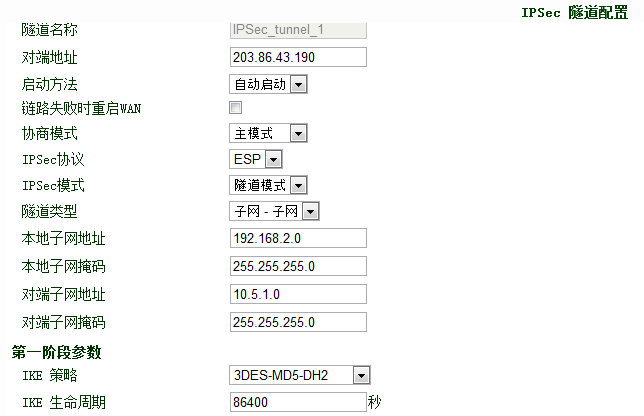
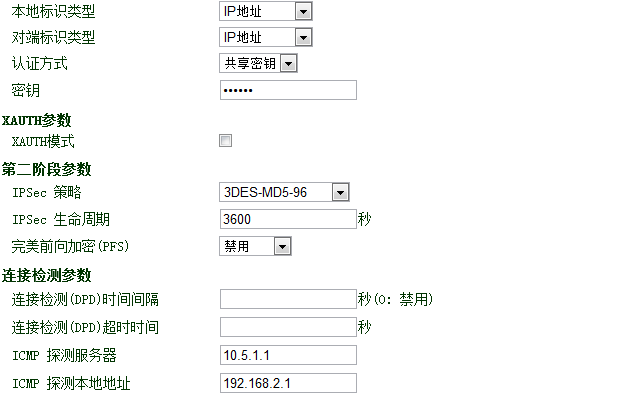
二、IR700相关配置


全部 0条评论