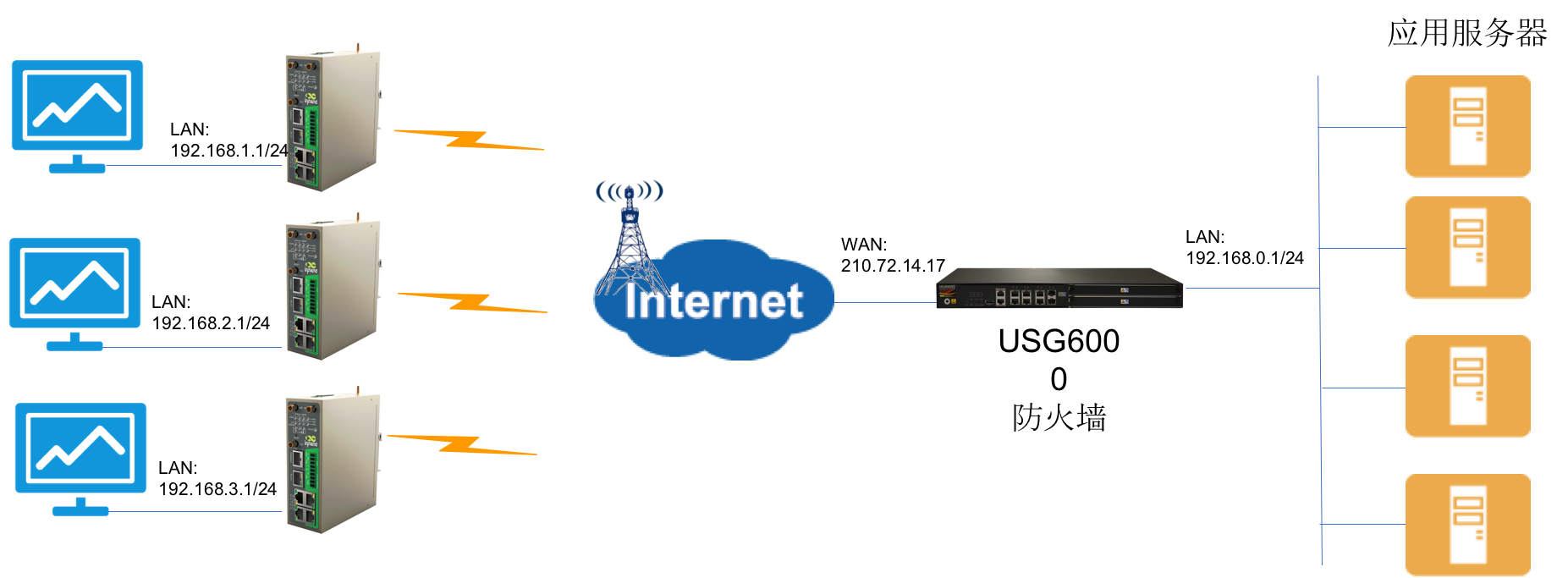
USG6308 配置方案
# CLI_VERSION=V100R001C30
# Last configuration was changed at 2016/07/12 11:37:21 from unknown-mode
#*****BEGIN****public****#
# Created at 2016/07/08 11:21:41
#
info-center source URL channel 0 log state off
info-center source URL channel 4 log state off
#
cpu-usage-mgmtplane alarm threshold enable
cpu-usage-dataplane alarm threshold enable
#
undo hrp ospfv3-cost adjust-enable
#
ip df-unreachables enable
#
dhcp enable
#
dns resolve
dns server 210.72.14.135
dns transparent-proxy enable
#
pki certificate access-control-policy default permit
#
dns proxy enable
#
license-server domain sdplsp.huawei.com
#
user-manage web-authentication security port 8887
user-manage single-sign-on ad mode plug-in
password-policy
level high
page-setting
user-manage security version tlsv1 tlsv1.1 tlsv1.2
#
firewall detect ftp
#
firewall packet-filter basic-protocol enable
sysname USG6300
#
web-manager security version tlsv1 tlsv1.1 tlsv1.2
web-manager enable
web-manager security enable port 8443
undo web-manager config-guide enable
#
update schedule daily 04:56
#
undo factory-configuration prohibit
#
undo rbl-filter enable
#
time-range worktime
period-range 08:00:00 to 18:00:00 working-day
#
acl number 3000
rule 5 permit ip source 192.168.1.0 0.0.0.255 destination 192.168.0.0 0.0.255.255
#
ike proposal 1
encryption-algorithm 3des
authentication-algorithm md5
integrity-algorithm hmac-md5-96
#
ike peer ike8715447122
exchange-mode aggressive
pre-shared-key abc123
ike-proposal 1
remote-id-type none
ipsec proposal prop8715447124
esp authentication-algorithm md5
esp encryption-algorithm 3des
ipsec policy-template tpl8715447124 1
security acl 3000
ike-peer ike871544712
alias inhand
proposal prop8715447124
local-address applied-interface
reverse-route enable
sa duration traffic-based 200000000
sa duration time-based 3600
#
ipsec policy ipsec8715447255 10000 isakmp template tpl8715447124
#
interface GigabitEthernet0/0/0
alias GE0/MGMT
ip address 192.168.0.1 255.255.255.0
dhcp select interface
dhcp server ip-range 192.168.0.1 192.168.0.254
#
interface GigabitEthernet1/0/1
ip address 210.72.14.17 255.255.255.128
ipsec policy ipsec8715447255 auto-neg
service-manage http permit
service-manage https permit
service-manage ping permit
service-manage telnet permit
firewall zone local
set priority 100
firewall zone trust
set priority 85
add interface GigabitEthernet0/0/0
add interface GigabitEthernet1/0/0
#
firewall zone untrust
set priority 5
add interface GigabitEthernet1/0/1
#
firewall zone dmz
set priority 50
#
aaa
authentication-scheme default
authentication-scheme admin_local
authentication-scheme admin_radius_local
authentication-scheme admin_hwtacacs_local
authentication-scheme admin_ad_local
authentication-scheme admin_ldap_local
authentication-scheme admin_radius
authentication-scheme admin_hwtacacs
authentication-scheme admin_ad
authentication-scheme admin_ldap
authentication-scheme admin_securid
authentication-scheme admin_securid_local
#
authorization-scheme default
#
accounting-scheme default
#
manager-user password-modify enable
manager-user audit-admin
password cipher %@%@`-6L/&g(AMWKB(I+e\QKDTKBV-qGQ^!il(lGU@V2,%c3eZQL%@%@
service-type web terminal
level 15
ssh authentication-type password
ssh service-type stelnet
#
manager-user admin
password cipher admin@1234
service-type web terminal
level 15
ftp-directory hda1:
ssh authentication-type password
ssh service-type stelnet
#
domain default
service-type access internet-access
reference user current-domain
new-user deny-authentication
#
role system-admin
description system-admin
role device-admin
description device-admin
role device-admin(monitor)
description device-admin(monitor)
role audit-admin
description audit-admin
bind manager-user audit-admin role audit-admin
#
nqa-jitter tag-version 1
#
ip route-static 0.0.0.0 0.0.0.0 GigabitEthernet1/0/1 210.72.14.254
#
telnet server enable
#
stelnet server enable
#
banner enable
#
undo dns proxy ipv6 enable
#
isp name "china mobile"
isp name "china mobile" set filename china-mobile.csv
isp name "china unicom"
isp name "china unicom" set filename china-unicom.csv
isp name "china telecom"
isp name "china telecom" set filename china-telecom.csv
isp name "china educationnet"
isp name "china educationnet" set filename china-educationnet.csv
#
user-interface con 0
authentication-mode aaa
user-interface vty 0 4
authentication-mode aaa
#
ip address-set 1 type object
address 0 192.168.0.0 mask 24
#
ip address-set 2 type object
address 0 192.168.2.0 mask 24
#
ip address-set sou type object
address 0 192.168.1.0 mask 24
#
ip address-set de type object
address 0 192.168.2.0 mask 24
#
ip address-set inhand2 type object
address 0 192.168.2.0 mask 24
#
security-policy
default action permit
#
nat-policy
rule name nonatIPSEC
source-zone trust
destination-zone untrust
source-address address-set sou
destination-address address-set de
action no-nat
rule name natPolicy
ce-zone trust
destination-zone untrust
source-address address-set sou
action nat easy-ip
#
audit-policy
#
proxy-policy
#
quota-policy
#
multi-interface
#
return
#-----END----#




全部 0条评论